

Parking
PARKING JUST GOT EASIER!
Parking at The Dow Event Center just got easier with our updated system, managed by Premium Parking. There's no stopping to pay an attendant. Simply park and pay right from your phone!
How It Works:
DRIVE IN AND PARK - Pull into any available space in any of the lots on the map below.
PAY FROM YOUR PHONE - Use any of the three options below to check out.
Three Easy Ways to Pay:
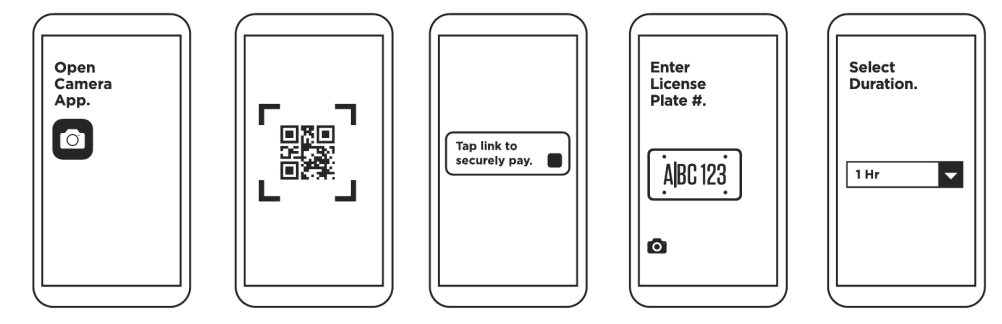
1. CameraPay® - Pay from your phone, no app download required. Scan the QR code on any nearby sign, tap the link, and check out in our secure mobile payment portal.
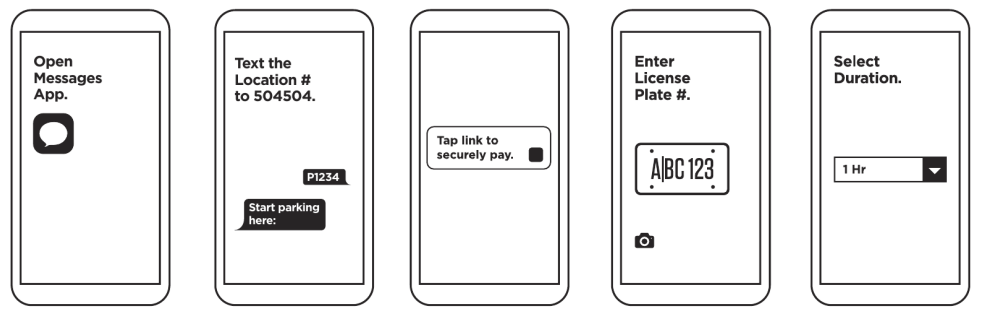
2. TextPay® - Prefer to text? Send the location number to the number shown on the signage, and we'll reply with a secure link to the same easy checkout.
3. Premium Parking App - Park here often? The Premium Parking app is the fastest way to find, pay for, and extend parking from anywhere. Save multiple vehicles and cards to your account and switch between them in a tap, no trip to a pay machine. You'll get an alert before your session ends so you can add time without going back to your car. Available for iOS and Android.
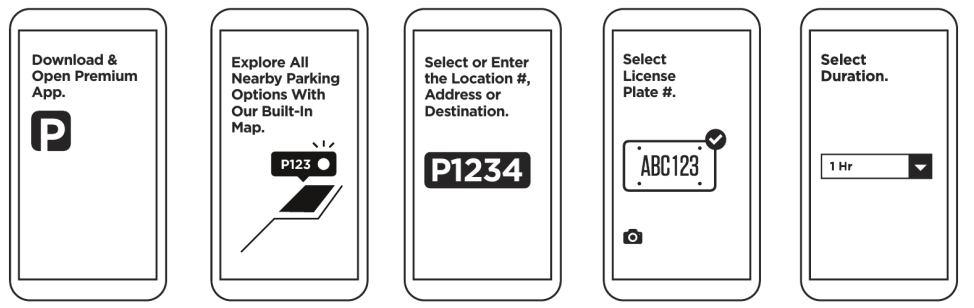
Once you've entered your license plate and payment info, you're good to go!
Pre-Paid Parking Reservations
For many events, pre-paid parking is available. Check below to see events offering reservations.
Available Parking Locations
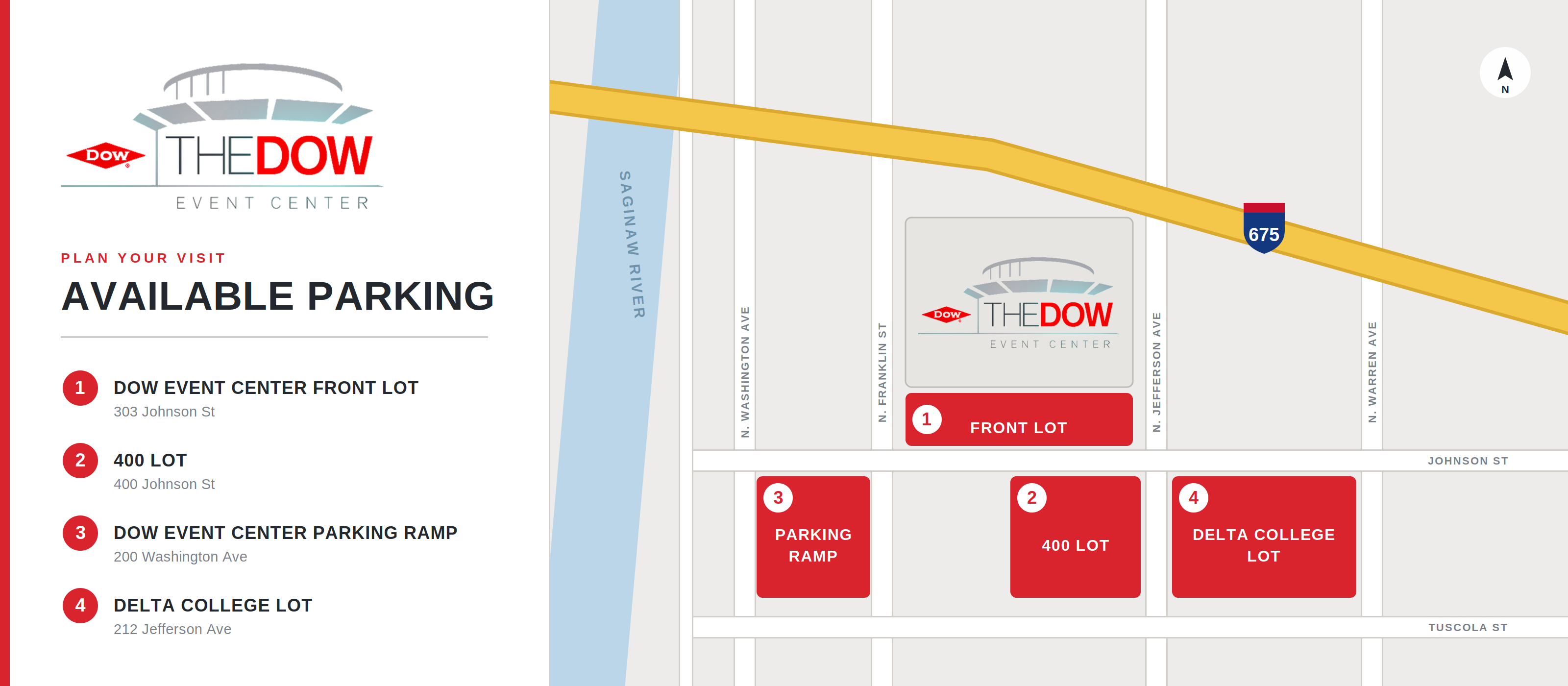
Parking is available in the following locations:
- Dow Event Center front lot, 303 Johnson Street
- 400 lot across from The Dow Event Center, 400 Johnson Street
- Dow Event Center Parking Ramp
- Delta College lot
Note: Not all parking surrounding the venue is operated by Premium Parking.
Parking FAQs
GETTING IN:
Do I need a reservation?
Reservations are not required. Parking is first-come, first-served. Prepaid parking is available for select events. Arrive early for best selection.
Is there a gate or an attendant booth?
No. Our lots are free-flow. Drive in, park in any available space, and pay from your phone. There is nothing to take, scan, or hand to anyone on the way in.
When do lots open?
The Parking Ramp and 400 Lot are open 24/7. The Front Lot typically opens 2 hours before doors on event days and when the Box Office is open.
Is accessible parking available?
Yes, designated accessible spaces are located in all Dow Event Center parking locations. A valid state-issued placard or plate is required, and standard rates apply.
Can I leave and come back?
Yes, your payment covers the full event, so same-day re-entry is included. However, space is not guaranteed upon returning.
What about oversized vehicles, RVs, or buses?
Parking for RVs, buses, and other oversized vehicles is not available. The Parking Ramp height limit is 6'8".
PAYING:
How do I pay on site if I haven't made a reservation?
There are three easy ways to pay, all from your phone.
1. CameraPay® - Scan the QR code on the signs and complete the payment process.
2. TextPay® - Text the P# of the location (P7821 for the ramp and P7822 for the 400 Lot) to 504504 and follow the link we send back.
3. Premium Parking App - Open the Premium Parking app, enter the location P#, and complete the process.
How long do I have to pay?
Please pay within 20 minutes of parking. Paying before you walk to the venue entrance is the easiest way to remember.
What payment methods are accepted?
Credit and debit cards, Apple Pay, and Google Pay. Cash is not accepted anywhere on site for parking.
How much does parking cost?
Rates vary by event.
Do I need to put anything on my dashboard?
No. Your license plate is your parking pass. Nothing gets printed, displayed, or scanned.
Will I get a receipt?
Yes. It is sent to you by text and email right away. Keep it if you need it for validation or an expense report.
My phone died, or I have no signal. Now what?
Find any staff member in a red polo shirt, or call the customer support number found on all signage (844-236-2011). We will get you taken care of on the spot.
I entered my license plate wrong. Can that be fixed?
Yes. Call the customer support number found on all signage (844-236-2011). Explain the situation and they can make the adjustment right away.
What happens if I do not pay?
A notice of unpaid parking is mailed to the vehicle's registered owner, along with additional processing fees.
How do I pay with a Canadian card?
Currently, Premium Parking only accepts U.S. zip codes. Here are two easy ways to pay with a Canadian card:
- Easiest Option - Apple Pay or Google Pay: Your phone wallet handles billing, so there's no ZIP code to type.
- Scan the QR code on the lot sign, then continue as guest.
- Enter your license plate.
- Tap Apple Pay or Google Pay and approve. You're done!
- No Phone Wallet - Use Your Postal Code Numbers: Scan the QR code, continue as a guest, then enter your license plate and card. For the ZIP code:
- Example: If your postal code is K2P5G3, keep the 3 numbers, then add 00. The number you would type in the ZIP code field would be 25300.
Still Not Going Through?
Call Premium Parking Customer Support at 1+ (844) 236-2011. We're here 24/7 to help you get parked.
HEADING OUT:
How do I exit?
Just drive out. There is no gate, no payment machine, and nothing to scan on your way out.
Can I get a refund?
To request a refund, call the customer support number found on all signage (844-236-2011) or email support@premiumparking.com.
STILL HAVE A QUESTION?
Visit premiumparking.com, call (844) 236-2011, or email support@premiumparking.com.